The audit your CIO can actually defend.
500+ checks, most mapped to NIST 800-53, CIS Benchmarks, DISA STIG, ISO 27001, SOC 2, PCI-DSS, HIPAA. The open alternative to Microsoft SQL Vulnerability Assessment, with deeper coverage. Every check names where its rule comes from. Every control is traceable.
A SQL Server audit tool that produces evidence, not opinions.
SQLTriage runs read-only audits across your SQL Server estate. It maps most findings to the specific clauses your auditor cares about. It emits a board-ready PDF. Every check names where its rule comes from. While the audit is running, it doubles as a monitoring dashboard. The audit is the headline.
Framework-mapped findings
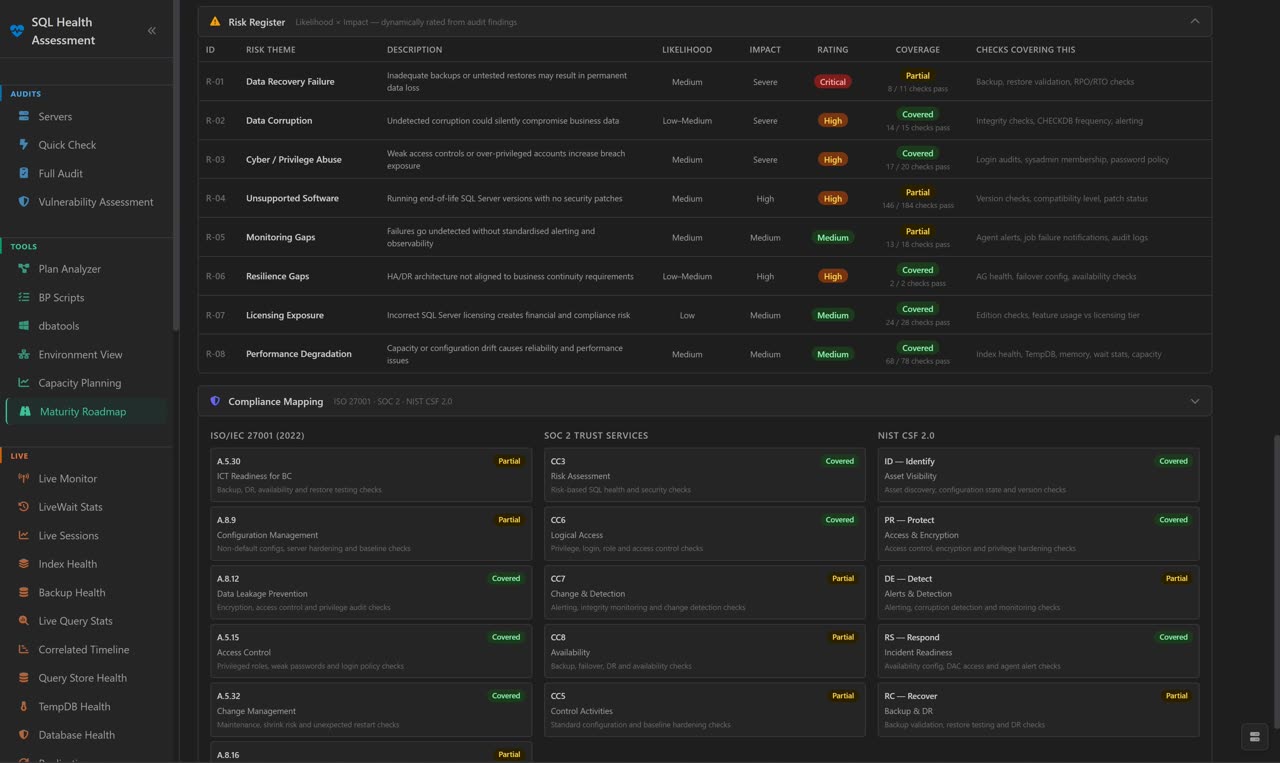
Most findings cite the specific NIST 800-53, CIS, ISO 27001, SOC 2, PCI-DSS, HIPAA or FedRAMP control they satisfy. No generic "configuration management" labels.
Evidence-grade citations
Every check names where its rule comes from. 401 of 523 link to the published source: Microsoft Learn, Brent Ozar, the CIS Benchmark and others. Auditors verify; we cite.
Maturity roadmap
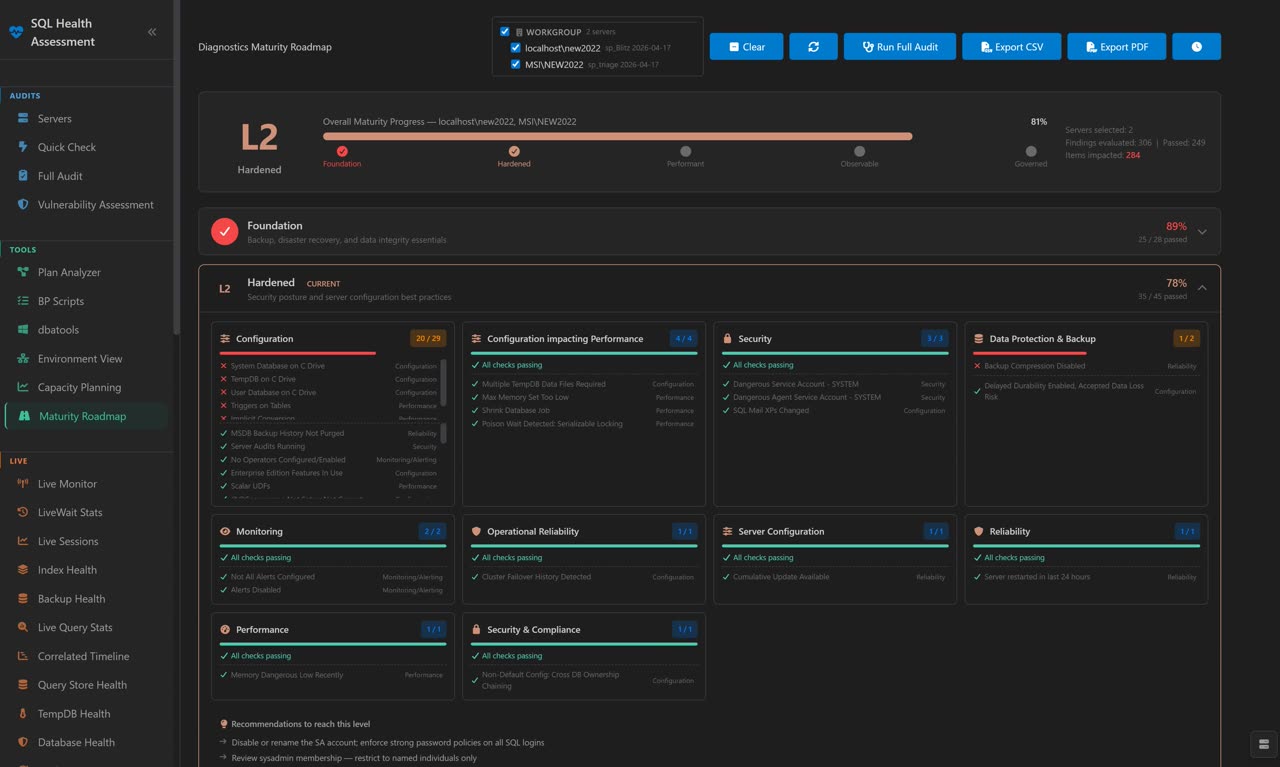
5-level DBA maturity model. See exactly where each instance sits and the next step to advance.
Boardroom PDF
Cover page, executive summary, framework coverage table, integrity hash, signature page. Ready for the audit committee, not a wall of YAML.
Read-only by default
Every check is a SELECT against DMVs. No writes, no schema changes, no agent on the SQL Server. Connect, scan, leave.
Live monitoring companion
While the audit is queued, watch wait stats, blocking chains, query plans, and dashboards. The "while you wait" surface, not the headline.
Framework-mapped compliance. Per-control evidence.
Most checks declare which framework controls they satisfy. Each mapping is a direct match between the failure mode and the control's published requirement, not a topical label.
The CIO question: "When my auditor pulls finding 47 at random and looks up the cited NIST control, will the control text actually say what we claim it says?"
That question shaped the entire check corpus. Mappings are reviewed against the framework's published control language — not topical adjacency, not template reuse.
500+ checks across security, performance, configuration, and recovery.
Drawn from authoritative sources, validated end-to-end on SQL Server 2017 and 2022.
Check sources
- Brent Ozar / sp_Blitz - 151 checks - community-validated checks from the SQL Server First Responder Kit
- Microsoft SQL Assessment API - 147 checks - the official Microsoft recommended ruleset for SQL Server
- Microsoft Tiger Toolbox / BPCheck - 58 checks - best-practice checks from the BPCheck script
- CIS Benchmark for SQL Server - 5 checks - Center for Internet Security hardening rules
- SQLWATCH - 1 check - from the open-source SQLWATCH project
- SQLTriage's own rules - 161 checks - written or adapted in this project; each check names its origin
Checks are evaluated read-only against live DMVs — nothing is written to your SQL Server.
SQLTriage vs the audit-first alternatives.
Most "SQL Server audit" tools fall into one of three buckets: Microsoft's own VA (narrow security scope), open community scripts (no framework mapping, no UI), or commercial monitoring suites (audit isn't the focus). SQLTriage is the productised open option in the audit-first lane.
| SQLTriage | Microsoft SQL VA | sp_Blitz | SQLWATCH | Redgate / SentryOne | |
|---|---|---|---|---|---|
| Cost | Free | Free (with SSMS) | Free | Free | $$$/server |
| Audit checks | 500+ | 87 (measured 2026-09) | 331 (measured 2026-09) | Monitoring-only | Varies |
| Framework mapping | 30+ frameworks | None | None | None | Limited |
| Named source per check | Yes | No | Inline only | No | No |
| Boardroom PDF output | Yes | SSMS export | Result grid only | Dashboards | Yes |
| Maturity roadmap | 5-level model | None | None | None | None |
| Live monitoring (companion) | Yes | No | No | Primary use | Primary use |
| Agent on SQL Server | No agent | No agent | Stored proc | SQL Agent jobs | Agent required |
| UI | Blazor desktop + service | SSMS only | SSMS results grid | Power BI | Web |
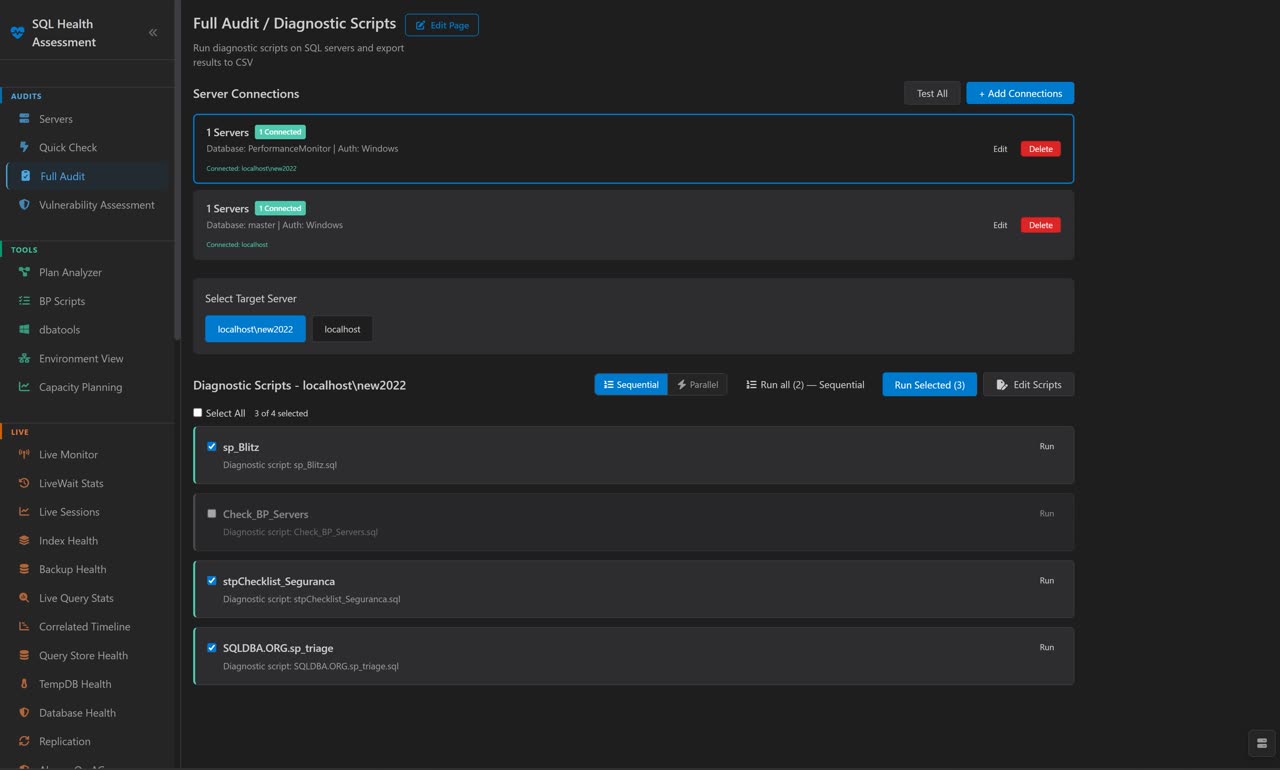
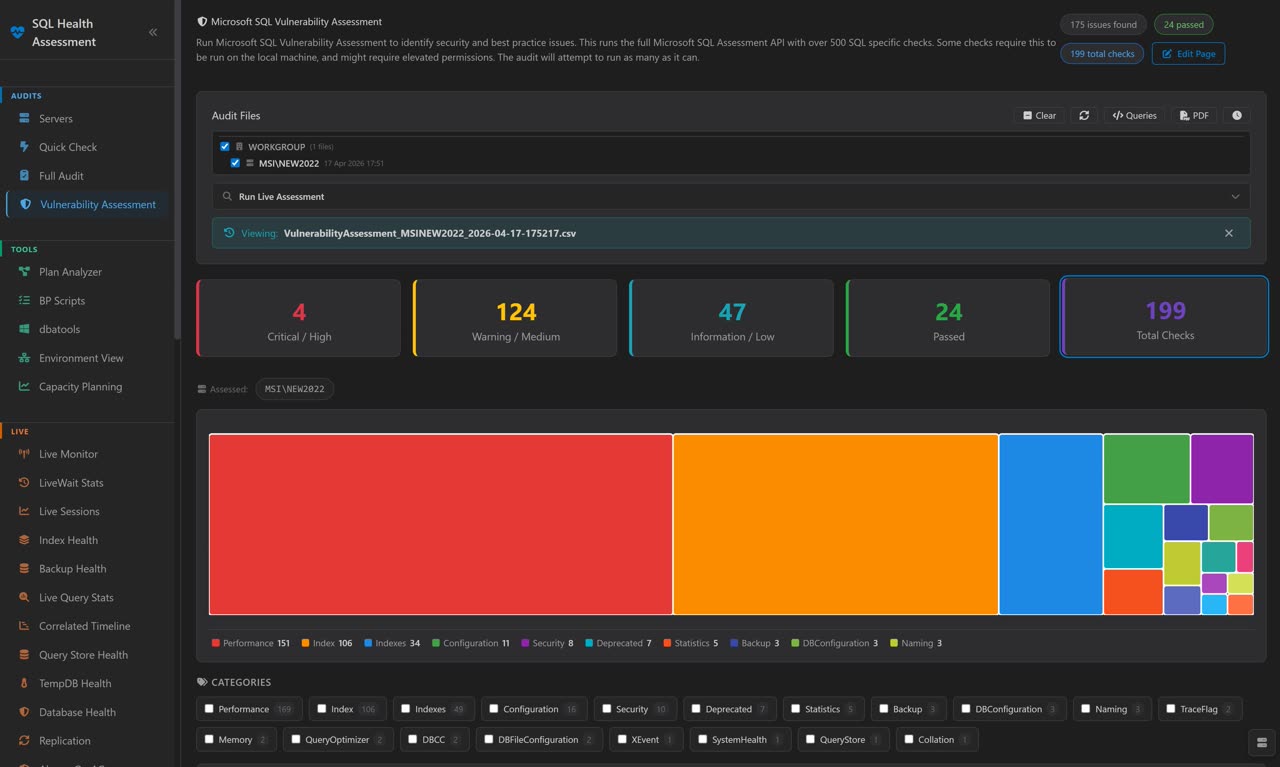
CIO Dashboard, Compliance Map, Maturity Roadmap, Findings Detail.
The audit surface comes first. Monitoring views live one click deeper.
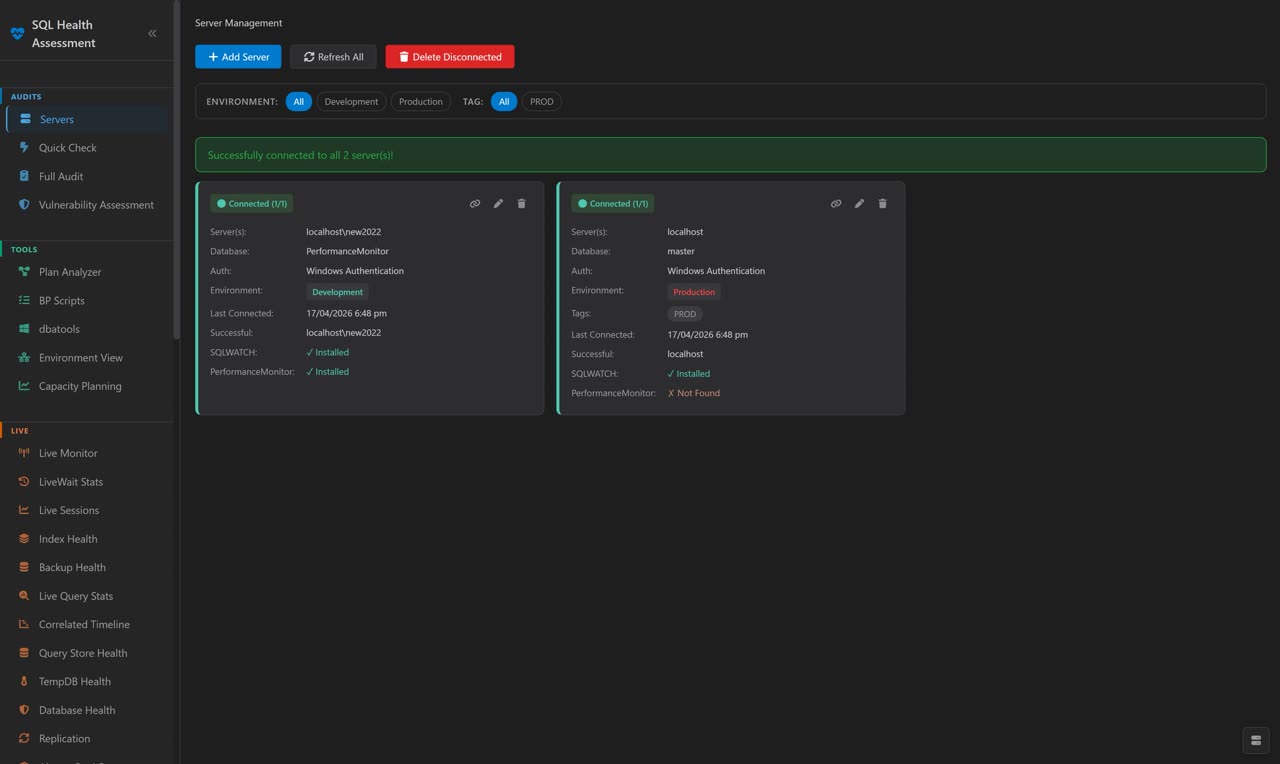
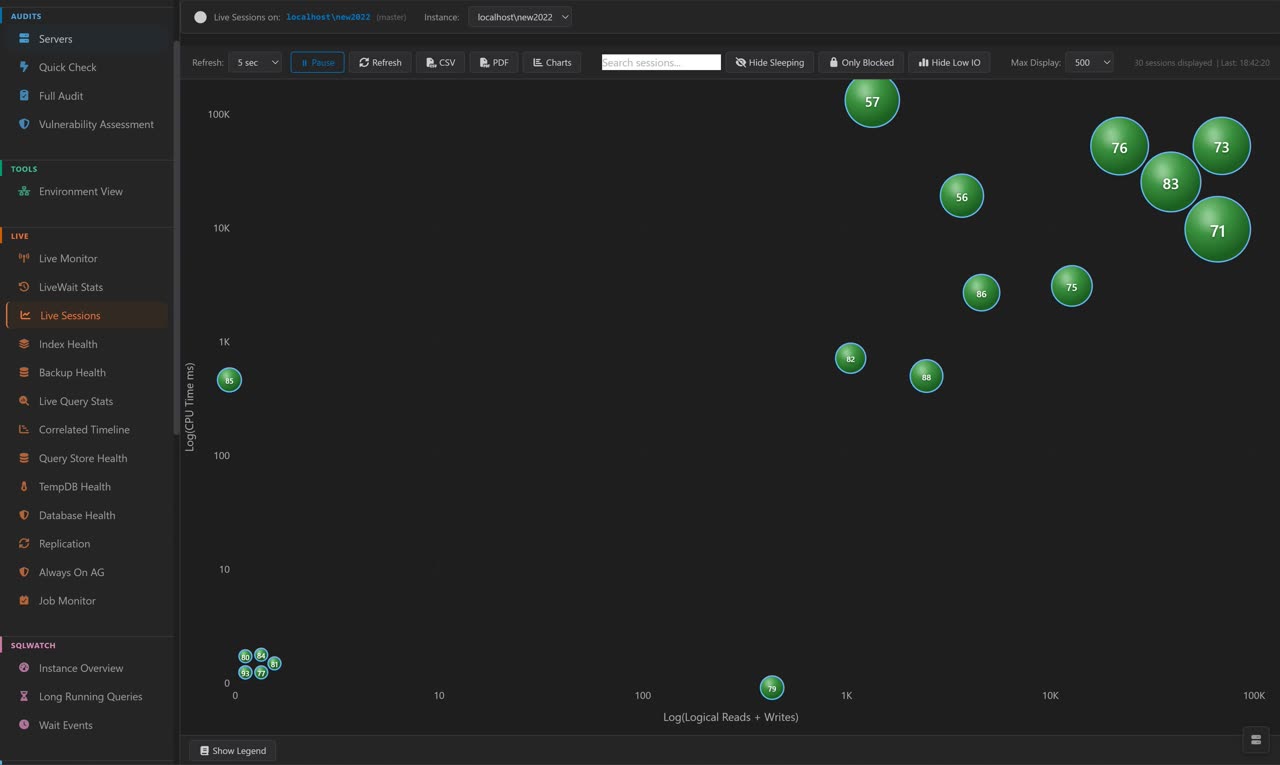

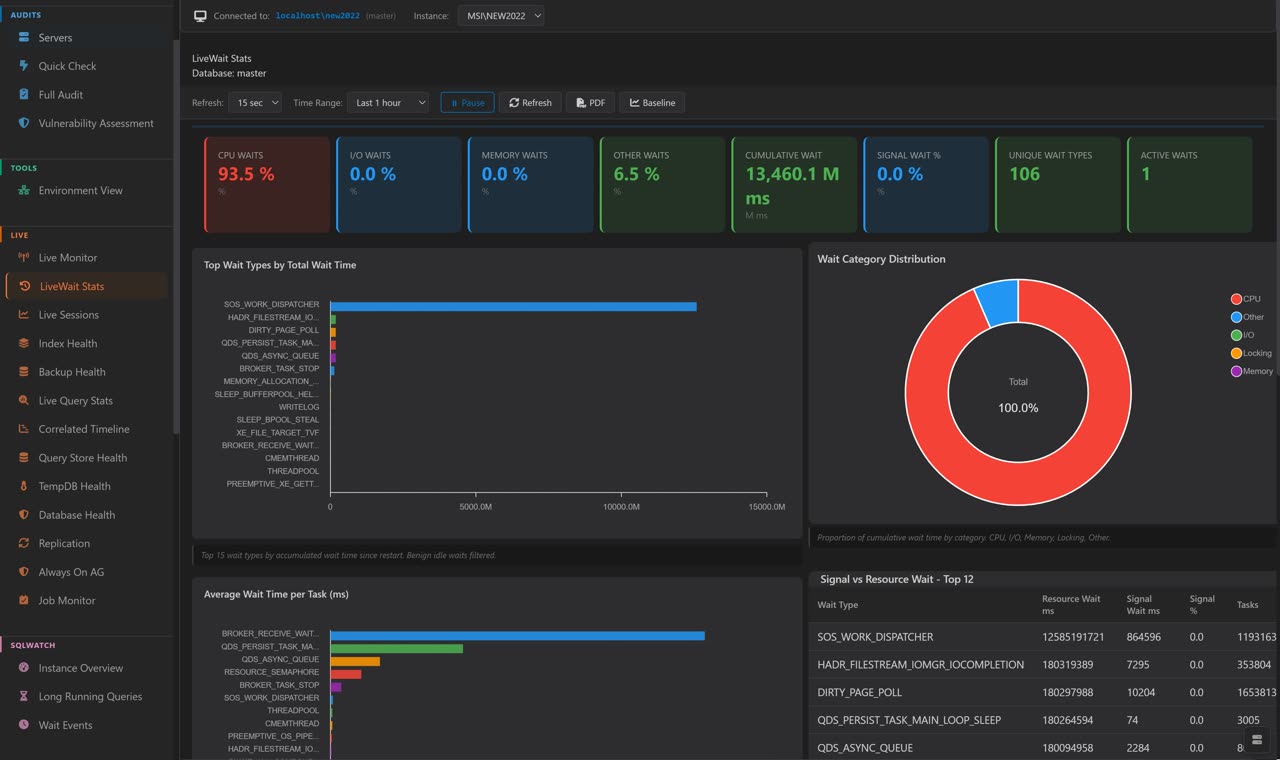

From download to first audit in under 90 seconds.
- Download the latest release from GitHub. Single self-contained executable — .NET runtime and WebView2 are bundled.
- Run
SQLTriage.exe. Onboarding wizard prompts you to add your first server. - Add an SQL Server instance — Windows Auth, SQL Auth, or Azure AD. Connection is read-only by default.
- Hit Run Quick Check — ~30 seconds across the 40 highest-priority audit controls.
- Review findings on the CIO Dashboard. Export the boardroom PDF when ready.
For 24/7 estate-wide audit history, install in Windows Service mode and access dashboards from any browser via Kestrel HTTPS.
Built for the people who sign the audit report.
Senior DBAs / DBA leads
Replace 200+ ad-hoc scripts with a single audit. Framework-mapped output you can hand to InfoSec without reformatting.
Database consultants
Standardise audit deliverables across clients. Reproducible methodology, a named source for every check, white-label PDF output.
InfoSec & compliance teams
Get SQL Server findings in a format that maps cleanly onto your existing GRC tooling. NIST controls in, NIST controls out.
CIOs & technology leaders
"How mature is our SQL estate?" answered in a 30-page PDF that survives an auditor's spot-check. Board-ready, not toolkit-shaped.
Common questions.
Does SQLTriage write to my SQL Server?
Not when you assess it. Every check is read-only against DMVs — no agent, no schema change, no extended event session. Connect, scan, leave.
Separately, SQLTriage ships opt-in deployment and remediation pages that do write, and they say so: Deploy SQLWATCH and Deploy Darling PerformanceMonitor each create their own database, objects and extended event sessions; Server Configuration & Hardening runs sp_configure/RECONFIGURE, registry writes and msdb Agent objects; the XEvents page creates and drops event sessions; Remediation applies an approved change. None of these runs as part of an assessment, on a schedule, or on connect — an operator has to open the page and confirm.
How is this different from Microsoft SQL Vulnerability Assessment?
Microsoft VA has 87 active rules (measured 2026-09), with no framework mapping, no remediation evidence trail and no maturity model. SQLTriage covers 500+ checks. Every check names where its rule comes from. 401 of 523 link to the published source. Most map to NIST/CIS/ISO/SOC 2/PCI/HIPAA/FedRAMP controls. The boardroom PDF is the output.
Is the framework mapping defensible to an auditor?
Yes — that's the whole design. Each control mapping cites the specific clause from the published framework. No "topical adjacency," no copy-paste boilerplate. If your auditor pulls a finding at random and looks up the cited control, the control text says what we claim it says.
Does it really run as a Windows Service?
Yes. Headless service mode exposes dashboards via Kestrel HTTPS for remote browser access — useful for 24/7 monitoring of multi-server estates. Or run it as a desktop app for one-off audits.
Azure SQL?
Azure SQL Managed Instance is fully supported. Azure SQL Database (PaaS) has partial support — checks that require server-level DMV access are skipped automatically with a friendly notice.
License?
GNU GPL v3. Free for commercial use, no per-server fees, no subscription, no feature tiers. Source on GitHub.
Why is my alert firing constantly?
Alerts use IQR-based dynamic baselines. If a metric is genuinely outside its historical 25–75 percentile range, the alert fires. To tune: open the alert's edit modal, increase NextAlertDelayMinutes to suppress repeated firings, or enable Dry-Run mode (Settings → Alerts) to see what would fire without actually firing.
Do I need SQLWATCH?
No. Most pages work without it. Only the long-term historical dashboards (capacity trends, week-over-week comparisons) benefit from SQLWATCH. Live diagnostics, alerts, and the query plan viewer all work without it.
How do I move my saved server credentials to another machine?
Settings → Server Credentials → Export. This produces an .lmcreds file protected with a passphrase you choose. On the target machine, Settings → Server Credentials → Import, supply the file and passphrase.
Where are the logs?
logs/app-YYYYMMDD.log next to the exe. Older logs are auto-rotated (kept 14 days). Set "Debug logging" in Settings to capture verbose output.
Have more questions?
Ask on GitHub Discussions · Full FAQ in QUICKSTART.md · Report a bug
Ready to audit your SQL Server estate?
Single download. No agent. No licensing. Your auditor will have nothing to argue with.